
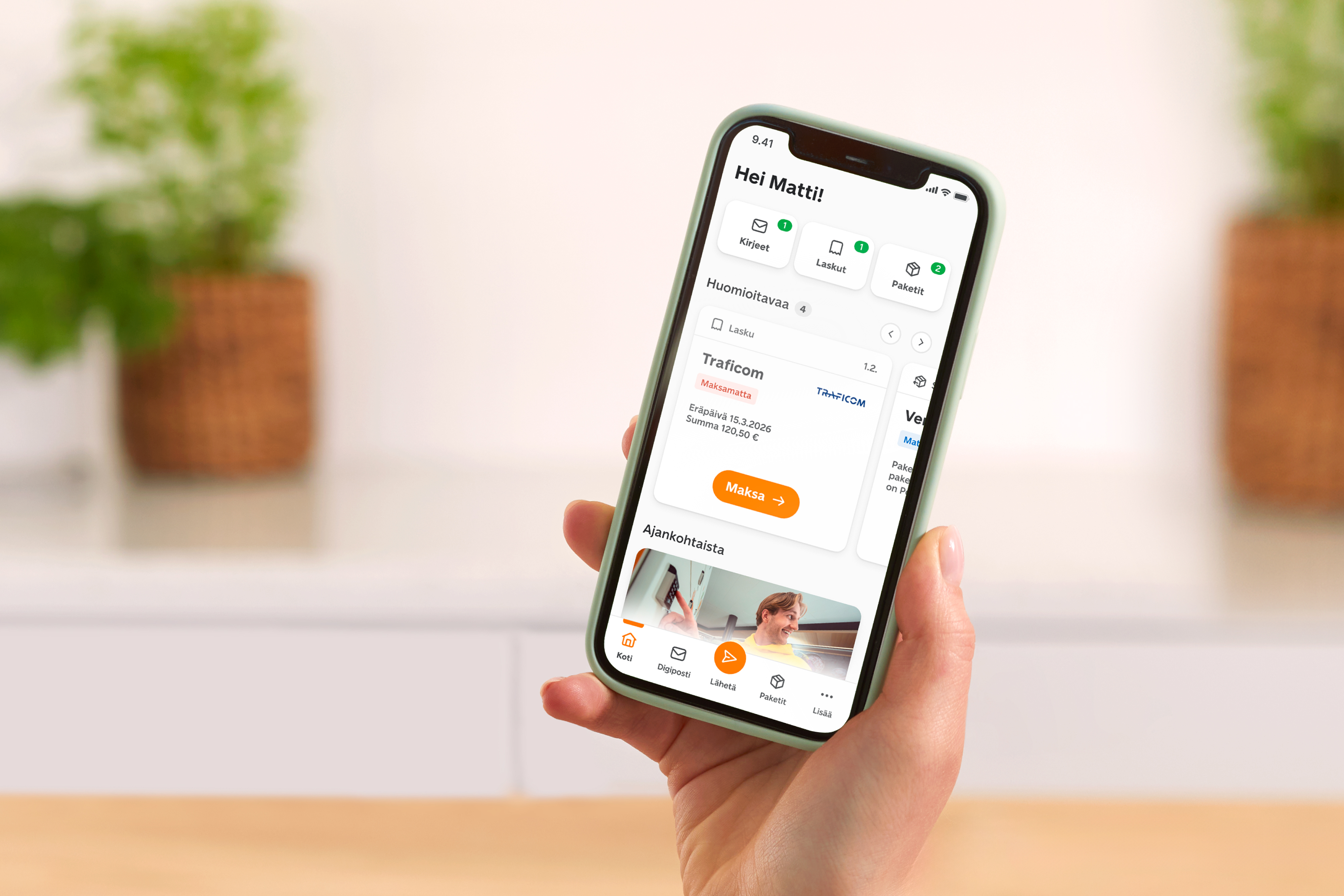
The OmaPosti home page now better reflects how people use the service.
Most OmaPosti users open the app for digital post – they want to view letters and invoices quickly and handle them easily. That’s why we redesigned the app’s structure and interface: digital post and parcels now appear side by side right on the home page.
The update covers three key views: the home page, the Parcels page, and the Digital post page. Each one is designed so that important things are easier to find and everyday tasks are simpler to manage.
Everything important visible on the home page
The redesigned home page brings together current parcels and digital post more clearly:
From the center of the page, you can immediately see if you have new letters or invoices or if your parcel has progressed.
New quick links at the top (Letters, Invoices, Parcels) take you straight to the content you want.
The bottom menu has been simplified so that key functions are easier to find.

The Send button for posting a new parcel is now more visible. From there, you can also find other items to post.
If you do not yet see the updated views in OmaPosti, check whether an update is available for the app in your app store. The newest version will make the changes available right away.
Parcel page shows status clearly
Parcels now have their own page, and tracking them is at least as easy as before. Each parcel’s status is marked with an easy-to-scan label, such as:
In processing
On the way
Ready for pickup
Attention needed

This way, you immediately know what’s happening – and what to do next.
By default, you’ll see all parcels that are on their way or incoming. If you want, you can also view received and sent parcels on their own tabs.
Digital post helps you stay up to date
The Digital post page shows what mail you’ve received and which senders have recently sent you digital post. You can read the latest messages or view all messages from a specific sender.

Unread and Unpaid labels help you see which letters are still unopened or need attention. You can also mark letters and invoices as read or paid, or archive them or download them to your device.

Often, digital versions of letters and invoices arrive before the paper ones, so you can take care of them right away. You can also choose digital post as your preferred delivery method for all senders or just selected ones.
Read more about digital post in these articles:
Digital post in OmaPosti – a secure place for your important messages
OmaPosti digital letters and invoices – digital post on your terms
Summary: how OmaPosti works now
Digital post and parcels now appear side by side on the home page. At a glance, you can see if you have new letters, invoices or a parcel on the way.
New quick links take you straight to key content. Letters, invoices and parcels are easy to find at the top of the home page.
The bottom menu has been simplified. Functions are easier to find, and sending a new parcel takes just one button.
Parcel tracking now has its own page. You can view received and sent parcels separately, and statuses are marked with clear labels such as “On the way” or “Ready for pickup.”
You can view digital post by sender. Read, archive, mark as read or pay invoices easily – and handle tasks as soon as a message arrives.
The update also supports a broader change: communication from public authorities is going digital, and digital post is becoming an increasingly important channel alongside paper mail. OmaPosti responds to this trend and makes digital post a handy everyday helper.